 AI Task Manager
Connections
A connection is one way of reaching a model: a subscription login or an API key. Add as many as you like in Settings → AI providers. Every task, team member and API proxy key runs on one of them.
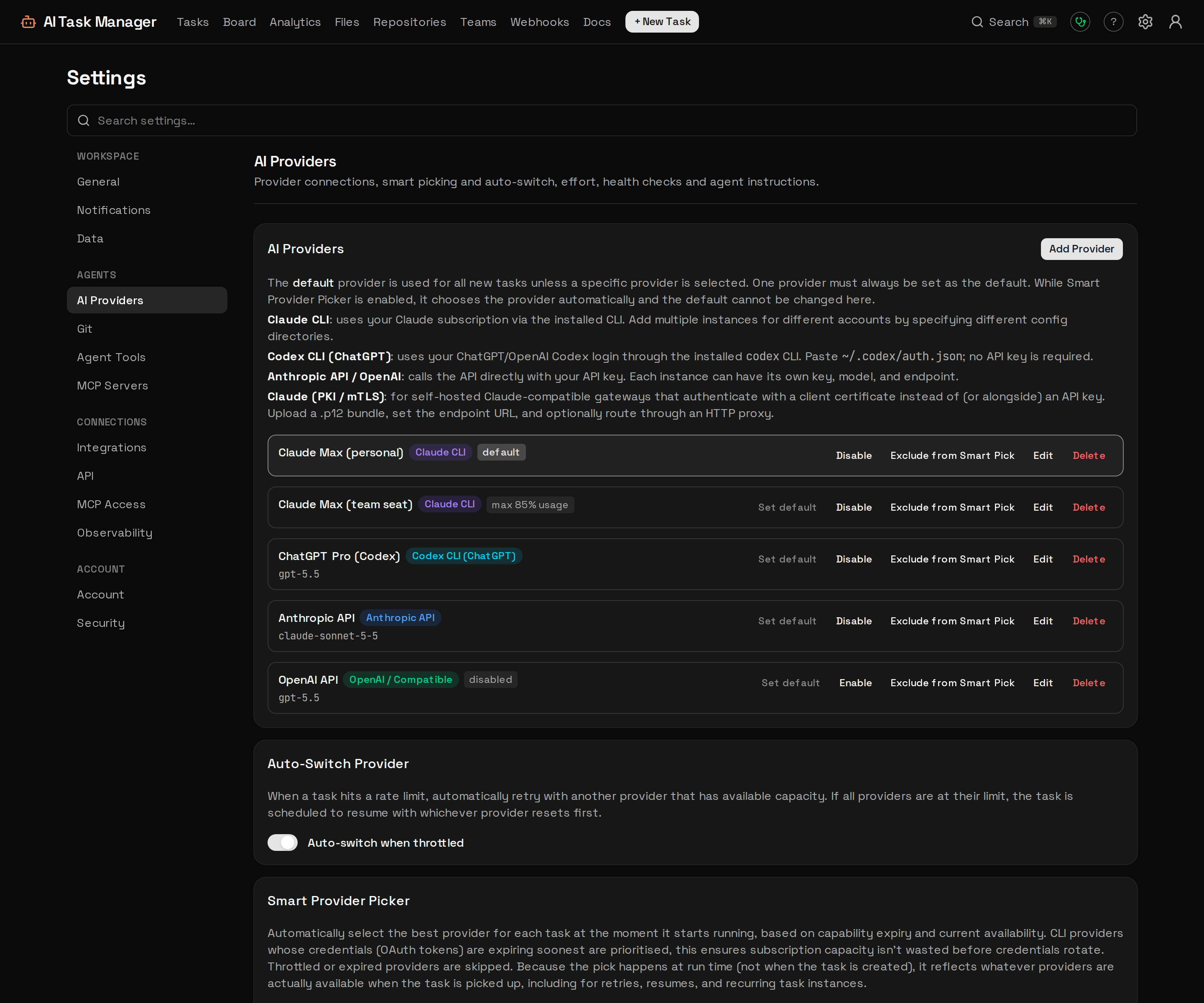
Connection types
| Type | What it uses | Billing |
|---|---|---|
| Claude CLI | Your Claude Pro or Max login, through the claude CLI | Your subscription |
| Codex CLI (ChatGPT) | Your ChatGPT login, through the codex CLI | Your subscription |
| Anthropic API | An Anthropic API key (custom base URL optional) | Per token |
| OpenAI / compatible | An OpenAI key, or any OpenAI-compatible endpoint | Per token |
| Claude (PKI / mTLS) | A self-hosted Claude-compatible gateway with a client certificate | Your gateway |
Use your CLI-only subscription
Claude Pro/Max and ChatGPT plans don't come with API keys: they only work through their own CLIs. AI Task Manager runs those CLIs for you, so a subscription you already pay for can do the work.
- Claude: add a Claude CLI connection and click Sign in with Claude. You get a link; log in, paste the code back, and the login is stored for that connection. It works the same in Docker and on a bare host.
- ChatGPT: run
codex loginon any machine and paste the contents of~/.codex/auth.jsoninto a Codex CLI connection.
To run several Claude accounts, give each connection its own config directory. Each instance of AI Task Manager needs its own login, because refresh tokens rotate and two installs sharing one keep logging each other out.
Plan usage at a glance
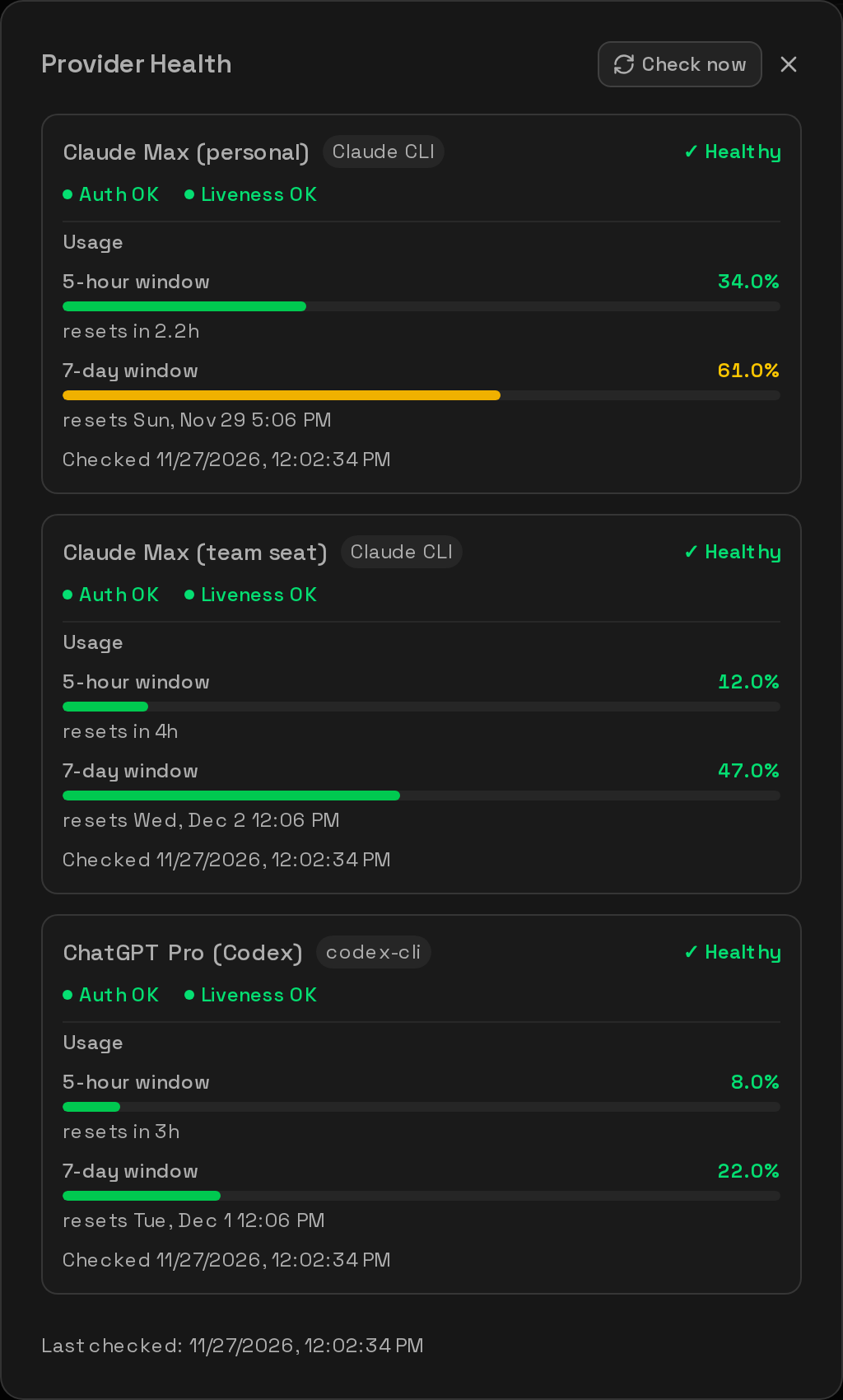
The health indicator in the top bar shows every connection's status and, for subscriptions, how much of the 5-hour and weekly windows you've used and when they reset.
Leave some for yourself
A subscription connection can set Max usage, such as 85%. Once either plan window reaches it, the task manager stops using that connection until the window resets, which leaves the rest of your plan for your own use. It's checked when a task is picked up, so a long run that starts just under the cap can finish above it.
Smart provider picker
Turn on Smart Provider Picker and each task gets the best connection available when it starts:
- Subscriptions come before metered API keys.
- Among subscriptions, the one whose weekly window resets soonest goes first, so capacity that's about to expire gets used rather than lost.
- Accounts that are already spent, or over their usage cap, are skipped.
A connection marked Exclude from Smart Pick is still available when you pick it by name.
When a connection runs out
- Rate limited: with Auto-switch provider on, the task moves to another connection with capacity. Otherwise it pauses and resumes when the window resets.
- Login expired or key revoked: the task is handed to another connection rather than failed, and you get a notification. The Sign in button on the connection fixes the login.
Either way the next run reuses the same workspace, so the agent continues from where it stopped.
Disabled means never used
A disabled connection is never picked: not by the smart picker, not by fallback, not by the API proxy and not by Slack. Disabled subscription connections still appear in the health view so you can see their usage, but nothing is run on them.